Designed so we can’t read your mail
A plain account of where your data sits: what stays on your device, what we hold for you in encrypted form, and the small, specific things our servers do see. The claims below map to code you can read and to a database migration that flipped our vault from server-encrypted to client-encrypted.
The diagram comes first. The sections beneath it explain each piece in detail, including the parts still being built and the rules they’ll follow when they ship.
How the data flows
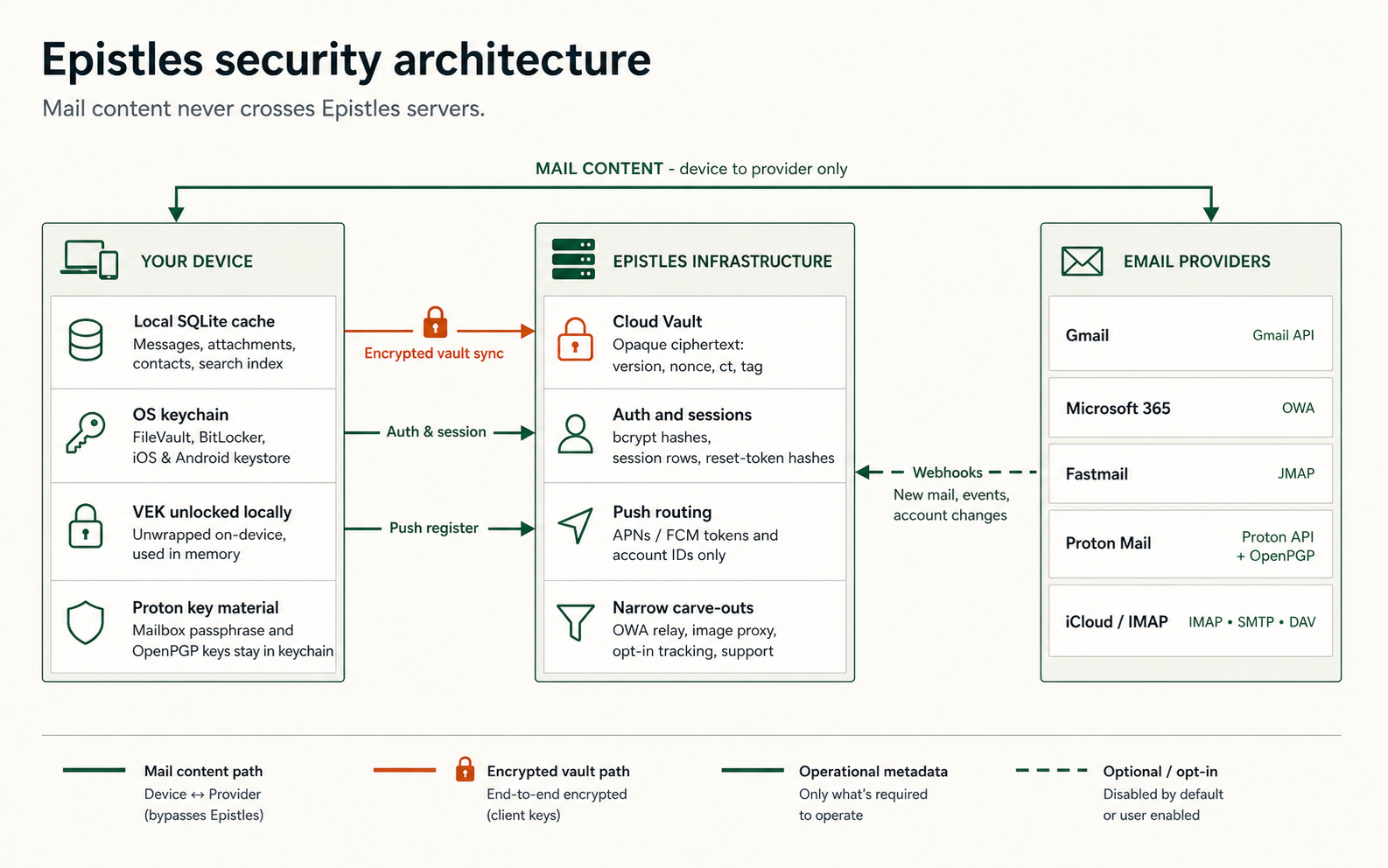
Mail moves directly between your device and your provider. What we hold on our API server is encrypted with a key only your device has, we cannot read it.
Encrypted, server-blind Metadata or opt-in only Mail content (device ↔ provider)
What our servers never see
These items don’t reach our API server in any form. Some of them cannot: the keys to decrypt them never leave your device. Others never travel because the relevant feature runs locally.
- The body of any email. Messages are fetched directly by your device from Fastmail, Gmail, Microsoft, Proton, or your IMAP host. They are stored in the local SQLite database on that device and nowhere else.
- Subjects, senders, recipients, and CC/BCC lists for mail you receive. Header data on inbound mail lives in the same local store as the body and never moves through our infrastructure. (Outbound mail you choose to track is the narrow exception, see below.)
- Attachments. Downloaded by your device from your provider, on demand, over your provider’s own connection.
- Folder structure and unread counts. The names of your folders and how you’ve organised your inbox are local-only.
- Search queries. Search runs against the local SQLite index. We have no query log because there is nothing for us to log.
- Contacts and address books. Pulled from your provider, cached on device, displayed by the client. We aren’t in the path.
- Your Epistles password. The password is sent to the server only during sign-in, compared against a
bcrypthash (cost 12), then forgotten. We store the hash, never the password. - Your Vault Encryption Key. The 256-bit VEK that decrypts your stored OAuth tokens and IMAP credentials is generated on your device, wrapped with a key derived from your password, and uploaded only as ciphertext we cannot unwrap.
- Your IMAP passwords, JMAP session blobs, and iCloud app-specific passwords in plaintext. They reach the server only as bytes encrypted with your VEK. The server holds the bytes; only your device can read them. iCloud uses an app-specific password rather than OAuth because Apple has no public OAuth program for iCloud data; the credential is stored under the same envelope as every other IMAP password. (OAuth refresh tokens themselves are a deliberate exception, see the carve-out below.)
- Proton mailbox passphrases and OpenPGP private keys. These stay in your operating system’s keychain. They are not synced through the Cloud Vault. See the Proton section below.
- Behavioural telemetry. No analytics SDK, no crash reporter, no product-usage metrics. The only network calls Epistles makes to our infrastructure are the functional ones described in the next section.
- Anything on your watch. The Apple Watch and Wear OS apps are companion-only. They request triage actions and rendered previews from the paired phone over the platform’s watch link and persist nothing of their own. No credentials, no VEK, no tokens, no message bodies. Take the watch off the wrist and the only data on it is whatever the OS caches for last-seen notifications, the same as any other watch app.
What our servers do see
An honest privacy story includes the parts that aren’t encrypted away. Every category of data that does reach our API server, what minimum form it takes there, and why we need it.
- Your email address.
- Stored in plaintext on the
usersrow. Used for sign-in, billing receipts, password-reset email, and anything you write to support. - A hash of your password.
- Stored as a
bcrypthash with cost 12 (seeBCRYPT_ROUNDSinapps/backend/src/lib/auth/auth.ts). The plaintext password reaches the server only during the seconds it takes to compare against the hash, and then is discarded. - Your wrapped Vault Encryption Key, plus its salt and version.
- Three columns on your
usersrow, added bymigrations/014_vault_zero_knowledge.sql:vault_kek_salt(a random 32-byte PBKDF2 salt),vault_wrapped_vek(your VEK, encrypted with a key derived from your password, in the format[ver:1][nonce:12][ct:32][tag:16]underAES-256-GCM), andkek_version(an integer that increments whenever you change or reset your password). The server cannot decrypt any of these. Their only purpose is to be handed back to your device on sign-in. - Your account-secret ciphertext, one row per connected account.
- Opaque
BYTEAbytes inconnected_account_secrets.ciphertext, written and read byapps/backend/src/lib/accounts/vault.ts. Each blob contains your provider tokens for that account, encrypted on your device with your VEK. The server stores the bytes byte-for-byte and forwards them to your other devices on demand. There is no server-side key that can read them. - Server-side session rows.
- A row in
user_sessionsper active sign-in. Each row holds the session identifier, your IP address at the time of sign-in, the client’sUser-Agentstring, and timestamps for last-activity and expiry. Lets you sign out everywhere, lets us invalidate compromised sessions, and powers the “active devices” list. - That a connected account exists, plus its provider, display name, and order.
- A
connected_accountsrow records the provider (e.g. gmail, fastmail) and the user it belongs to. The actual provider credentials sit in the encrypted ciphertext alongside it, not on this row. We also hold your client-side preferences, account order, theme, swipe-action settings, whether you’ve turned on tracking for an account, so they sync between devices. UI preferences are not encrypted at rest because they aren’t secrets. - Device push tokens.
- APNs and FCM tokens, stored in
push_devices. Required by Apple and Google to deliver notifications. We never include message content in a push, only the account that has new mail. - Image-proxy fetches.
- When your client renders an email’s remote images through
/api/img-proxy, our server fetches the URL on your behalf and streams the bytes back. The proxy holds the URL and the response in flight; we don’t keep a record of which images you load. This is a privacy feature (it hides your IP from the sender’s tracking pixel), not a logging point. - Outbound tracking events.
- When you turn on read-tracking for an email you’re composing, we issue a tracking pixel for that one message. When the recipient opens the message, the pixel fires and we record the open. To make the resulting notification useful (“Alice just read your message Re: project update”), we do hold a few non-credential fields server-side for tracked outbound messages: the message’s subject preview, the recipient’s display name, a hashed recipient email, and aggregated open counts. Recipient IPs and user-agents are hashed with a per-server salt before storage. Off by default, opt-in per email, and never used on mail you receive. ProtonMail accounts cannot send tracked mail by design.
- Microsoft 365 traffic, while in flight.
- Microsoft’s API doesn’t accept direct browser connections, so when you use Outlook on the web through Epistles, your traffic flows through our relay on its way to Microsoft. The relay streams the bytes through unread, drops your browser fingerprint headers, and verifies that the destination is one of three Microsoft hosts. Nothing is buffered or stored. Native apps (Mac, mobile) talk to Microsoft directly without the proxy.
- Support tickets you write us.
- Whatever you put in the support form, whatever that is, that’s what we have.
That is the full list. If something a feature would seem to need is not above, it is because that feature runs on your device and never asks us.
The Cloud Vault, in detail
The Cloud Vault holds your connected-account credentials, IMAP and SMTP passwords, JMAP session blobs, iCloud app-specific passwords, so that adding an account on your laptop also makes it work on your phone without re-doing the wizard. The vault has one job and one promise: store your secrets across devices, and remain unable to read them. (OAuth refresh tokens take a separate path, documented below.)
The promise is a property of the design, not a policy. There is no key on our servers that decrypts your account secrets. The key that decrypts them is derived from your Epistles password on your device, and the password itself reaches us only as a bcrypt hash. A subpoena can only retrieve what we have. A server compromise can only expose what the database holds. Both yield the same thing: opaque ciphertext bytes.
The migration that made this true is apps/backend/migrations/014_vault_zero_knowledge.sql. Before it, the server held a master encryption key (EPISTLES_ENCRYPTION_KEY) and could read every user’s OAuth refresh tokens. After it, the server cannot. The server-side module that touches the vault is apps/backend/src/lib/accounts/vault.ts, sixty-odd lines that do nothing but write and read raw bytes. The client-side counterpart is packages/core/src/sync/vaultCrypto.ts, which does the actual encryption. Both are open to read.
What happens when you sign in
- You type your email address and password into the Epistles client.
- The client sends both to our API server over TLS.
- The server compares the password against the
bcrypthash on yourusersrow. The plaintext password is checked, then dropped from server memory. - The server returns four things: a session cookie, your salt (
vault_kek_salt), your wrapped VEK ciphertext (vault_wrapped_vek), and the currentkek_version. - Your device derives a Key-Encryption Key from your password and the salt using
PBKDF2-SHA256. The web target uses 600,000 iterations, the OWASP 2023 recommendation for an attacker who has the wrapped VEK and unlimited offline guessing time. Native targets (Mac, mobile) use 10,000 iterations and additionally protect the wrapped VEK with the operating system keychain, which rate-limits offline brute force. - Your device uses the KEK to unwrap the VEK. The KEK is then zeroed from memory.
- Your device uses the VEK to decrypt the per-account ciphertexts it pulls from the server. OAuth tokens and IMAP passwords come back to life locally, ready for the sync engine to use.
- The unwrapped VEK lives in process memory until you sign out or quit. On native targets it is also persisted via the OS keychain so you don’t have to type your password every cold start.
lockVault()zeroes it on sign-out.
Two devices stay in step through kek_version. When you change your password on your laptop, your laptop re-wraps the VEK under a new KEK and bumps the version on the server. Next time your phone pulls the vault, it sees a version it doesn’t hold and prompts you for the new password. The per-account ciphertexts themselves don’t change, the VEK is still the same, only the wrapping was updated.
A password reset invalidates the credentials in your vault
If you forget your password and reset it via the email link, every credential we hold for your connected accounts is invalidated, IMAP passwords, JMAP session blobs, app-specific passwords. Each is encrypted with a key derived from your password, and your password is the only thing that derives it. A new password derives a new key, which can’t unlock what was sealed under the old one. We discard the old envelopes (the rows in connected_account_secrets) and the OAuth refresh tokens we hold separately, and you sign back in to each connected email account on your next visit. Your mail itself isn’t affected: it lives at your provider, not with us, and the cached copy on your device stays where it is. A password manager is the right pairing for an Epistles account.
OAuth refresh tokens are deliberately not in the zero-knowledge envelope
The vault holds IMAP passwords, JMAP session blobs, and the like. OAuth refresh tokens for Gmail and Fastmail live in a separate table (oauth_account_tokens), encrypted at rest with a backend-held key, not your VEK. The backend is the single rotator: when your device needs a fresh access bearer it asks /api/accounts/:id/access-token and the backend mints one, rotating the refresh token in place if the provider rotated theirs.
This is a carve-out, not an oversight. Modern providers (Fastmail, Google) issue single-use refresh tokens, every refresh invalidates the previous one. If multiple devices and the push worker each tried to rotate from their own copy, exactly one would win and the rest would brick the chain with invalid_grant. Centralising rotation on the backend is the only design that survives push fan-out from a server you’re not signed into. The price is that the backend can read those refresh tokens. Everything else (mail content, IMAP credentials, app-specific passwords, display names, scope settings) stays inside the zero-knowledge envelope. The provider’s own access controls still apply: a refresh token alone doesn’t bypass MFA, doesn’t change your provider password, and can be revoked from your provider’s security dashboard at any time.
ProtonMail’s keys live on your device
ProtonMail is built around a different zero-knowledge promise, theirs. Proton’s servers never see your mailbox passphrase or your OpenPGP private keys; everything is decrypted in your client. We preserve that property by handling Proton accounts differently from every other provider in Epistles.
Your Proton mailbox passphrase and the OpenPGP private keys it unlocks are stored in your operating system’s keychain, macOS Keychain on Mac, the equivalents on iOS, Android, and Linux. They are not synced through the Cloud Vault. Adding Proton on your laptop does not make Proton work on your phone; you unlock Proton on each device once. This is intentional. Putting Proton key material into our vault would mean it touched our servers in any form, even encrypted, and that’s a stronger guarantee than we’re willing to dilute, even by a layer of our own ciphertext.
Proton message bodies and attachments follow the same rule as every other provider in Epistles: they’re fetched from Proton directly by your device, decrypted on-device with the keys in your keychain, and shown to you. They never travel through our API server. The relay, when it ships, will deliver only “new mail at this Proton account” signals, same metadata-only rule as the other providers.
One more thing worth saying plainly, because we say it on our comparison pages and it belongs here too: Proton publishes no official API for third-party mail clients. Epistles speaks the same private API Proton’s own web app and Bridge use, reverse-engineered from Proton’s open-source clients and community implementations. Proton does not sanction or endorse this integration. Wherever this site says “Proton API,” that is what it means.
If our servers were compromised
The most useful test of any security claim is to imagine it failing. So: suppose an attacker walks straight into our API server tomorrow morning, root on the boxes, full read access to the database, log pipelines, the lot. What would they walk out with, and what would still be out of reach? The answer is the whole point of the design.
The server holds two kinds of material. The first is ordinary application data we need to operate the service: addresses, hashes, sessions, the fact that an account exists. The second is a small set of opaque ciphertext blobs the server cannot read on its own, chiefly the wrapped Vault Encryption Key and the per-account secret envelopes. The first set is exposed in a breach. The second set becomes a brute-force problem against the user’s Epistles password, not a giveaway. The OAuth refresh tokens for Gmail and Fastmail accounts are the carved-out exception, see the bullet below.
What an attacker would walk away with
- The email address you signed up with.
- Your bcrypt password hash, salted, slow, and per-account, but a brute-force target given enough time and a weak password.
- Your per-user PBKDF2 salt and your wrapped VEK ciphertext, another brute-force target, gated by the platform’s PBKDF2 iteration cost on every guess.
- OAuth refresh tokens for Gmail and Fastmail accounts (encrypted at rest with a backend-held key, not your VEK, see the carve-out section above). These would let an attacker mint provider access tokens until you revoke them at the provider, a real cost honestly priced.
- Active server-side session rows, including the IP and user-agent recorded at sign-in. Until rotated, an active row would let an attacker impersonate the session.
- Account-existence rows: which providers each account is connected to (Gmail, Microsoft, Fastmail, IMAP, ProtonMail), but not what is inside any of them.
- UI preferences synced through the vault, theme, account order, swipe configuration, whether you’ve turned on tracking for an account.
- Device push tokens (APNs and FCM identifiers).
- Outbound tracking-event records for messages where you opted into open or click tracking: subject preview, recipient display name, hashed recipient email, hashed recipient IP and user-agent, open and click counts.
- Support ticket text you sent us, and any address that subscribed to product updates.
What an attacker would not have
- Any plaintext password. We store bcrypt hashes only.
- Any usable Vault Encryption Key. The wrapped VEK is opaque ciphertext; without your Epistles password, the KEK that unwraps it cannot be derived.
- Any usable IMAP password, JMAP session blob, or iCloud app-specific password. These decrypt only with the VEK.
- Any email content, no subjects on inbound mail, no bodies, no recipient lists, no attachments. None of that touches our servers.
- Any Proton key material. Proton mailbox passphrases and OpenPGP private keys never leave your device’s OS keychain.
- Anything cached on your devices. Your local SQLite store stays on your devices.
The honest caveat is that bcrypt and PBKDF2 are slow, not infinite. The zero-knowledge property rests on one assumption: your Epistles password is strong and unique. A six-character password we hash many times is still a six-character password; given the wrapped VEK and the salt, an attacker with a fast cluster will crack a weak one eventually. A long passphrase or a generated password from a manager turns “eventually” into “not in any timeframe that matters.” That part of the threat model is yours, and it’s the only part of it you control.
Common questions
These are the questions that come up most often. The answers below are the same ones we’d give you in a support ticket, no softer, no more elaborate.
What happens if I forget my Epistles password?
You can reset it via the email link. The reset invalidates every credential we hold for your connected email accounts, each is encrypted with a key derived from your old password, and the new password derives a new key that can’t unlock them. You sign back in to each connected account once on your next visit; your mail itself stays where it lives, at your provider. We have no copy of your Vault Encryption Key anywhere on our infrastructure, so there’s no path that preserves the old credentials. A password manager is the right pairing for an Epistles account.
What if I change my Epistles password?
Smooth. We re-wrap the existing VEK under a new KEK derived from the new password and bump kek_version. Your per-account ciphertexts continue to decrypt, the VEK itself didn’t change, only the wrapper around it. Other devices notice the version bump on their next vault pull and prompt you for the new password. You don’t need to re-OAuth anything.
If I sign in on a second device, do my accounts come along?
Yes, that is exactly what the Cloud Vault is for. The new device fetches the wrapped VEK from the server, derives the KEK from the password you just typed, unwraps the VEK locally, then decrypts the per-account secret blobs. The server only ferries opaque bytes throughout. The zero-knowledge property holds across as many devices as you sign in on. The exception is ProtonMail: because Proton keys never travel through the vault, you’ll add your Proton account once on each new device.
Where do my email passwords and OAuth tokens actually live?
On your device, encrypted with your Vault Encryption Key. Within Epistles’s own data, those credentials are always either VEK-encrypted ciphertext (on the server, on disk, in transit) or plaintext briefly in memory (only on your device, only after the VEK has been unwrapped from your password). The local SQLite database itself relies on your operating system’s disk encryption, FileVault on Mac, BitLocker on Windows, Data Protection on iOS, File-Based Encryption on Android, rather than a separate Epistles encryption layer. If you don’t have OS disk encryption turned on, neither does your mail cache.
What about ProtonMail?
ProtonMail’s mailbox passphrase and your OpenPGP key material live in your operating-system keychain only. They never enter the Cloud Vault and they never travel to our servers, not even as ciphertext. Proton built their service around a zero-knowledge model of their own, and the Epistles adapter preserves it.
Can a court order make you hand over my mail?
We comply with valid legal process, and we’re honest about what that produces. We can hand over: the email address you signed up with, your bcrypt password hash, your wrapped VEK ciphertext, your OAuth refresh tokens for Gmail and Fastmail (encrypted at rest with a backend-held key), account-existence records, UI-preference rows, session rows (including the IP and user-agent of each sign-in), device push tokens, outbound tracking-event records for messages you tracked, support tickets, and subscribe records. We cannot hand over: your mail, your password, your IMAP credentials, your JMAP session blobs, or your Vault Encryption Key, we don’t have any of those. A subpoena that asks for them returns the ciphertext we hold and nothing more.
Do you use any third parties that see my data?
A short list, scoped narrowly. Amazon SES delivers transactional email from us (sign-in confirmations, password resets, billing receipts) and sees the address those land at. Stripe handles billing if you subscribe and sees what Stripe needs to bill you. Our hosting provider runs the servers that hold the data described above. Sentry receives backend error reports, stack traces and request metadata, not email content or vault material. None of these subprocessors receive your mail, your VEK, or your account credentials.
Does Epistles run any analytics, telemetry, or crash reporting on my device?
No. The desktop and mobile apps ship with no analytics SDK, no third-party crash reporter, and no usage telemetry. Debugging happens through named logs that stay on your device until you choose to export a diagnostic bundle and send it to us. If we don’t hear from you, we don’t hear from your app.
Is the source code open?
No. Epistles is proprietary closed-source software and the source code is not public. The trust mechanism we offer instead is a published subprocessor list, a strict zero-telemetry posture, AES-256-GCM client-side encryption for the Cloud Vault, and this page documenting the architecture and failure modes in detail. If “read the code” is the trust model you require, Thunderbird is a genuinely good open-source email client and we recommend it without irony.
Subprocessors we use
Three third parties touch parts of our infrastructure. Each is scoped narrowly; none ever sees your mail content, your password, or your Vault Encryption Key.
- Amazon SES · transactional email
- Sends sign-in confirmations, password-reset emails, and billing receipts on our behalf. Sees the email address those land at and the body we wrote (no user content). No access to mailboxes, vaults, or sessions.
- Stripe · billing
- Handles Pro-tier subscriptions when you choose to subscribe. Sees what Stripe needs to bill you (card details, billing address, the email we paired with your account). PCI-DSS Level 1. No access to mailboxes, vaults, or sessions.
- Sentry · backend error reporting
- Receives stack traces and request metadata when our backend throws an unexpected error. Configured to scrub email content, vault ciphertext, OAuth tokens, and user identifiers before transmission. Does not run on your device, only on api.epistles.net.
Our hosting provider runs the servers that hold the data described in our privacy policy. Beyond these four, no other party touches user data. The marketing site (this page) uses Google Analytics for visitor metrics; the apps do not.
Reporting a vulnerability
If you find a vulnerability in Epistles, we’d like to hear from you. Send the report to security@epistles.com. Please include enough detail to reproduce: the affected component, a proof of concept, and the version or commit you tested against. We welcome reports across the whole surface, the desktop and mobile apps, the backend at our API server, the marketing and web-app origins, the OAuth flows, the Cloud Vault protocol, the OWA and image proxies, and our handling of secrets and sessions.
In return: we’ll acknowledge your report within three business days, keep you informed as we triage and fix, and credit you in the release notes if you’d like to be credited. We will not pursue legal action against good-faith research that respects user privacy, avoids data destruction, and stops at the minimum needed to demonstrate the issue.
Email: security@epistles.com